Employer Batch Change Log
Overview
Processing > Employer Batch Change > Log
You can
quickly get a overview of the Employer Batch Change
Output Format
- Click on
the Hyperlink "XLSX: Employer Batch Detail Update Log"
- Spreadsheet - You can open up
reports in Excel or Open Office when they are in this format. Once you have
the information in Excel it is easy to sort the information according to your
specific business needs.
- The Report can
also Email to the specific User.
The necessary
Setups for Email address must be
setup.

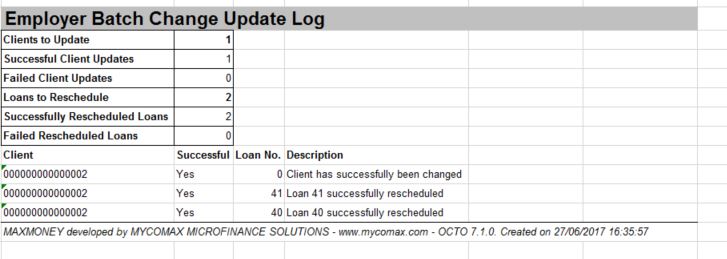
Columns/Detail
The
following information is available:
-
Employer: The Name of the
Employer
-
PayPoint: The Paypoint on the
Employer
-
Client to
Update: The Amount of
Clients been
updated
-
Successful
Client Updates: The Amount Successful Client
Update
-
Failed
Client Updates: The Amount Failed
Clients that was not been
Update
-
Loans to
Reschedule: The Amount
of Reschedule
Loans
-
Successfully Reschedule Loans: The
Amount of Successfully Reschedule Loans
-
Failed
Rescheduled Loans: The Amount of
Failed Reschedule Loans that was not been
updated
Information of
Client been updated:
Client
: The Client Number for which the
Employer Batch Detail was been updated
Successful: Is the information as on the
Employer Batch successfully been updated?
Loan No .: The Loan Number for which the
Employer Batch Detail was been updated
Description: The description of the details
that is been updated
Back: Return to the previous
page
MAXMONEY Developed by MYCOMAX MICROFINANCE
SOLUTIONS. Novamesh 03/09/2026