Overview
MAXCONSUMER SETUP
Go to Setup > MAXCONSUMER
> MAXCONSUMER Setup
MAXCONSUMER
SETUP
Enabled: Select the checkbox to
enable the MAXCONSUMER setup
Preferred choice for NLR Reg/Updates: In the
dropbox select Experian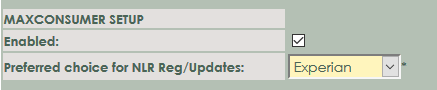
MAXCONSUMER SETUP
Go to Setup > MAXCONSUMER > Experian
> Experian Setup
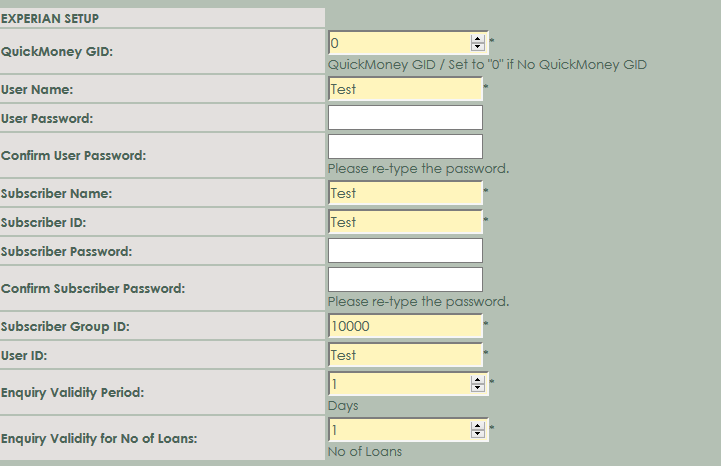
EXPERIAN SETUP
QuickMoney GID: Enter your
QuickMoney GID in the space. This information is required. If you
don't have a QuickMoney GID Number enter a 0.
User Name: Enter the User Name.
User Password:
Enter your User password as supplied by Consumer.
Confirm User
Password: Re-enter the password - the same as above.
Subscriber
Name: Enter the Subscriber Name.
Subscriber ID: Enter the Subscriber ID.
Subscriber
Password: Enter the Subscriber Password as supplied by
Consumer.
Confirm
Subscriber Password: Re-enter the password - the same as
above.
Subscriber Group
ID: Enter the Subscriber Group ID
User ID: Enter the User ID
Enquiry Validity
Period: Enter the amount of days for the enquiry validity
periods
Enquiry Validity
for No of L oans: Enter the amount loans for the enquiry validity
loans