Overview
An eWallet can be added using either the cellphone number or card number.
Go to Client Administration > Search for existing Client > Highlight the Client > Edit Client > Banking > Add a New Wallet
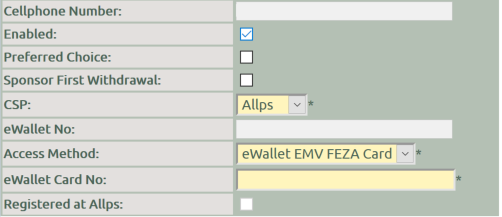
Cellphone
Number : The cellphone number added to Edit Client > Address will be
displayed
Enabled : Select the box to enable the
eWallet
Preferred Choice : Select this box to use the
eWallet for payouts
CSP : Select Allps from the
list
eWallet No : Once the
wallet is successfully created, the eWallet account number will be
displayed.
Access Method : Select the wallet creation
method.
-
Cellphone Number : The cellphone number added to the client will be used for registering the eWallet. The funds can be withdrawn using the cellphone number
-
eWallet EMV FEZA Card : The eWallet will be registered using a card number. The funds can be withdrawn using the Card and PIN
eWallet Card No : If FEZA
card was selected as the access method, enter the card
number
Registered at Allps : Once the wallet is successfully
created, the box will be marked
Print the eWallet Card Receipt