Overview
Go to Employers > Search for an Existing Employer > Edit Employer
Payback Information
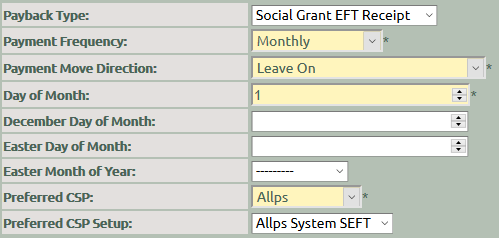
Set up the Allps SEFT Payback Information per employer. When the employer is selected on a client, the payback information can generate on the client.
Payback Type :
Select Social
Grant EFT Receipt from the dropdown list.
Payment Frequency : Select Monthly from the
dropdown list
Payment Move Direction :
Select Leave On from the dropdown list
Day of Month : Enter the Day of the Month as the
1st
Preferred CSP
: Select Allps from the dropdown list
Preferred CSP Setup : Select the SEFT Receipt option for the applicable branch