Overview
Go to Client Administration > Search for an Existing Client > Edit Client
Payback
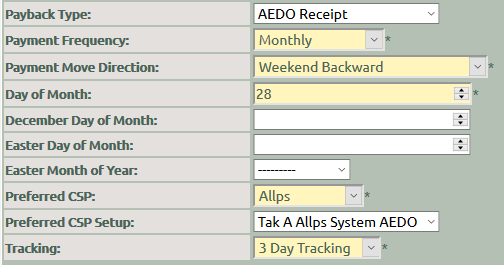
Complete the payback information on the client, for Allps AEDO transactions, similar to that of the employer. The information added here will display on the loan.
Payback Type : Select AEDO Receipt from
the dropdown list.
Payment
Frequency : How often does the client get paid, e.g. Monthly
Payment Move Direction
: Should the pay date fall on a Sunday or Public Holiday, will the
client get paid before or after the usual pay date?
Day of Month : If a
client is paid monthly, on which day of the month does he usually get
paid?
Day of the Week : If a client is paid weekly or
fortnightly, on which day of the week does he usually get
paid?
Monthly by Rule : If a client is paid monthly, but not
on a specific date, selected the
rule from the dropdown list, e.g. 2nd last day.
Preferred CSP : Select Allps from the dropdown
list
Preferred CSP Setup
: Select the AEDO Receipt option for the applicable branch
Tracking : Select the number of days for tracking
from the dropdown list