Compuscan Bath Successful send items
Sorting/Display Order
Date
.
You can print, view or e-mail
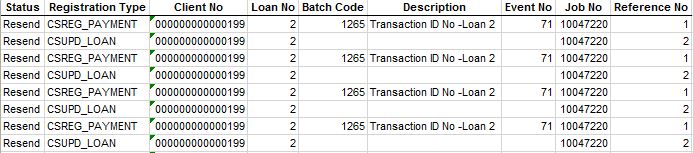
the Compuscan Batch Successful Send Items Report For a date range
of Client number range view the entries which were uploaded to Compuscan via
the afterhours batch processes.

Output
Format
- Click on
the Hyperlink " XLS: Compuscan Batch
Successful Send Items Report "
Spreadsheet
- You can open up reports in Excel or Open Office when they are
in this format. Once you have the information in Excel it is easy to
sort the information according to your specific business needs.-
The Report can
also Email to the specific User.
The necessary
Setups for Email address must
be setup.

Columns/Detail
-
The following
information is available:
-
Status: The status of the Compuscan
Batch been send successfully
-
Registration Type: The type of the
registration on the Compuscan
Batch been send successfully
-
Client Number: The Client Number for the
Compuscan Batch been send successfully
-
Loan Number: The Loan Number for this
Compuscan Batch been send successfully
-
Batch Code: The Batch Code for this
Compuscan Batch been send successfully
- Description: The Description for this
Compuscan Batch been send successfully
-
Event Number: The Financial Event number
that was been used for the processing of the receipt
-
Job Number: The Job Number for
this Compuscan Batch been send successfully
-
Reference Number: The Reference Number
for this Compuscan Batch been
send successfully
Back to Compuscan Batch List: Return to the
previous page
MAXMONEY Developed by MYCOMAX MICROFINANCE
SOLUTIONS. Novamesh 03/09/2026