NCR Form 39 Reports
Overview
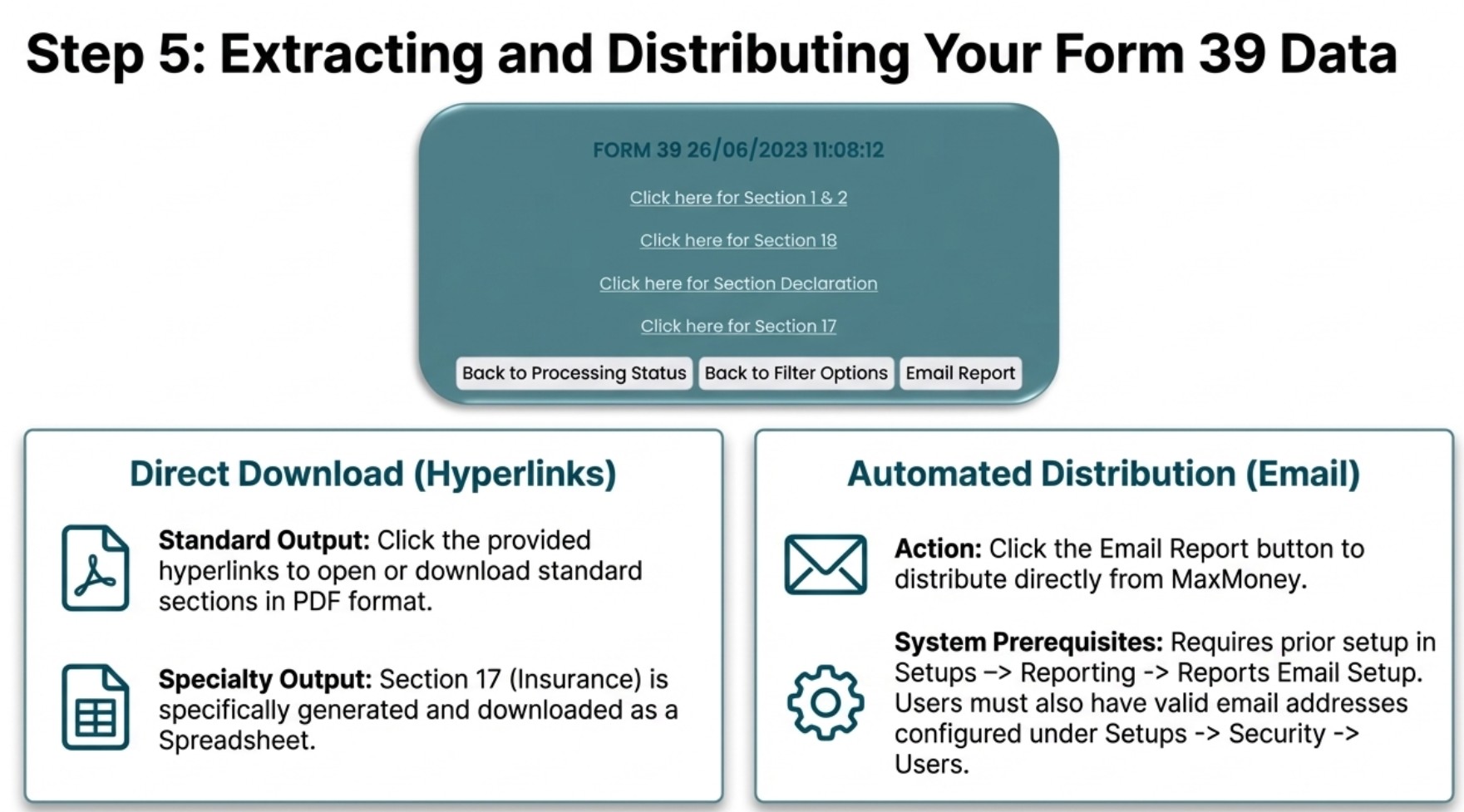
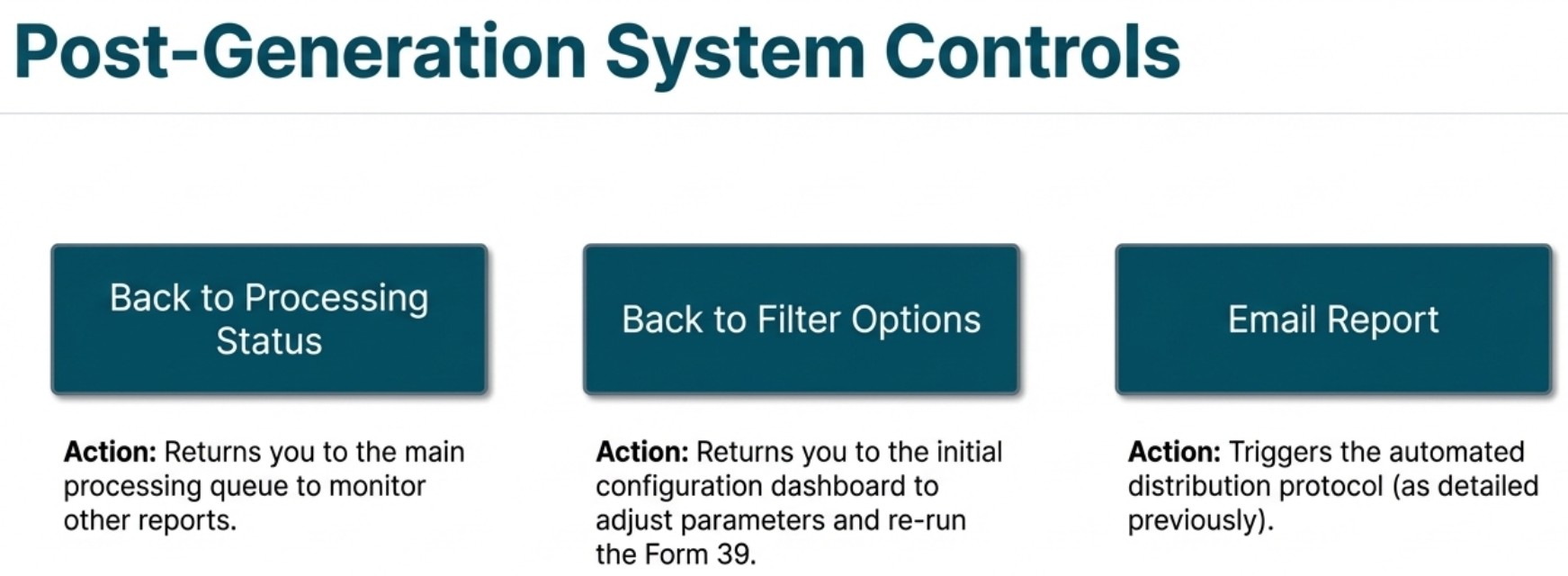
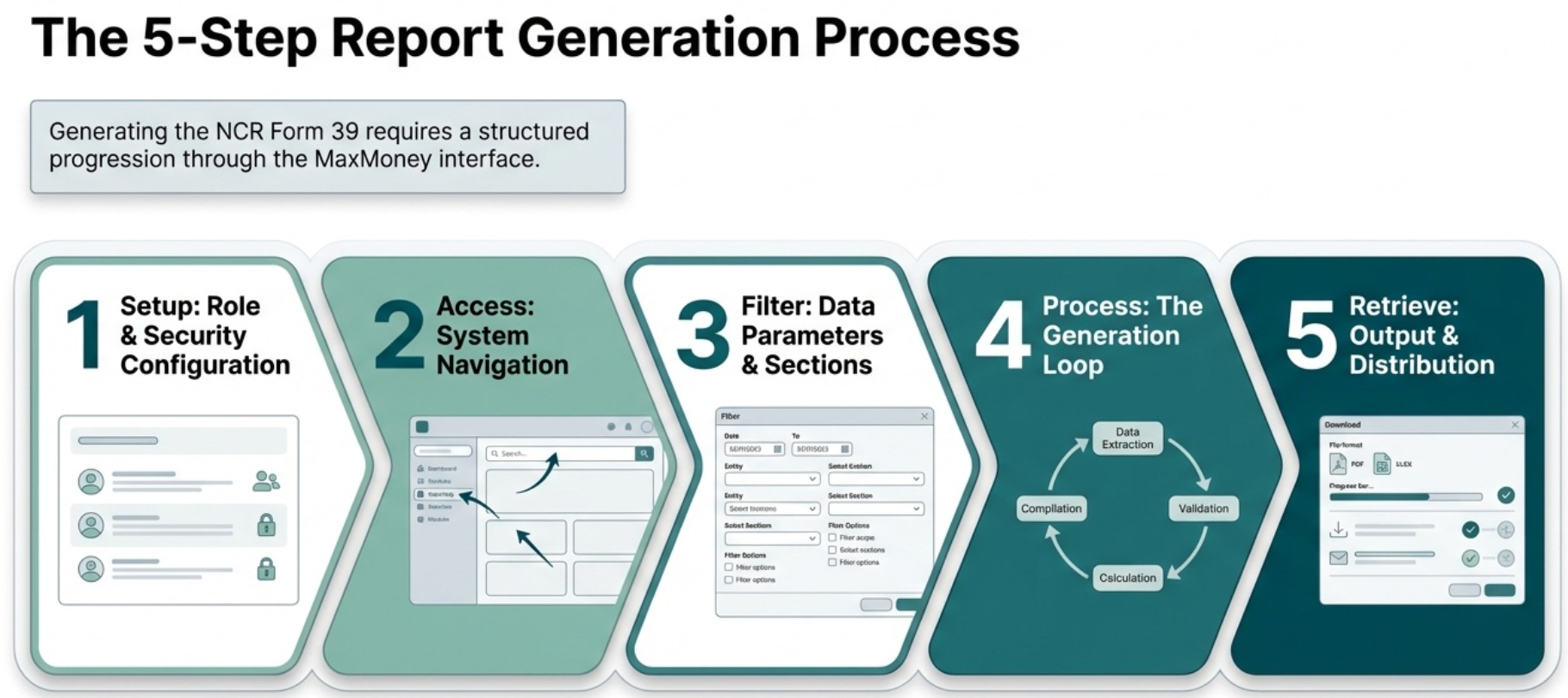
This document serves as a manual for generating Form 39 compliance documents within the MaxMoney software system. Developed by Mycomax MicroFinance Solutions, the guide specifically assists South African credit providers in meeting their legal National Credit Regulator (NCR) reporting obligations. It details the user interface navigation and the various filtering options available to categorise financial data, such as mortgage agreements, unsecured credit, and insurance. The documentation also provides instructions on processing status monitoring, downloading finished reports in PDF or spreadsheet formats, and configuring automated email distribution for authorised personnel. Ultimately, the text ensures that legal entities can accurately compile and submit mandatory regulatory declarations regarding their lending activities.
Required Submission
All registered Credit Providers have a legal
obligation
to submit Statistical Returns (Form 39) to the NCR.
The
email address for submission is returns@ncr.org.za
Timeframes
In terms of Regulation 64 of the National Credit Act, read together with the Conditions of Registration issued under section 52(5)(c) of the Act, all Credit Providers must submit Form 39 within the prescribed timeframes.
FORM 39: Quarterly submissions for large credit providers and annual submissions for small credit providers
-
Credit providers that grant up to R15 million per annum in credit must submit an annual return.
-
The annual return is for the period 1 January to 31 December. The submission date is 15 February.
-
Credit providers that grant more than R15 million per annum in credit must submit a quarterly return.
-
Quarterly & Annual Submissions are due on 15 February
Important Compliance Notice
Failure to submit prescribed reports and returns constitutes a contravention of section 52(5)(f) of the National Credit Act and may result in regulatory action.
Step 3: Report Filters
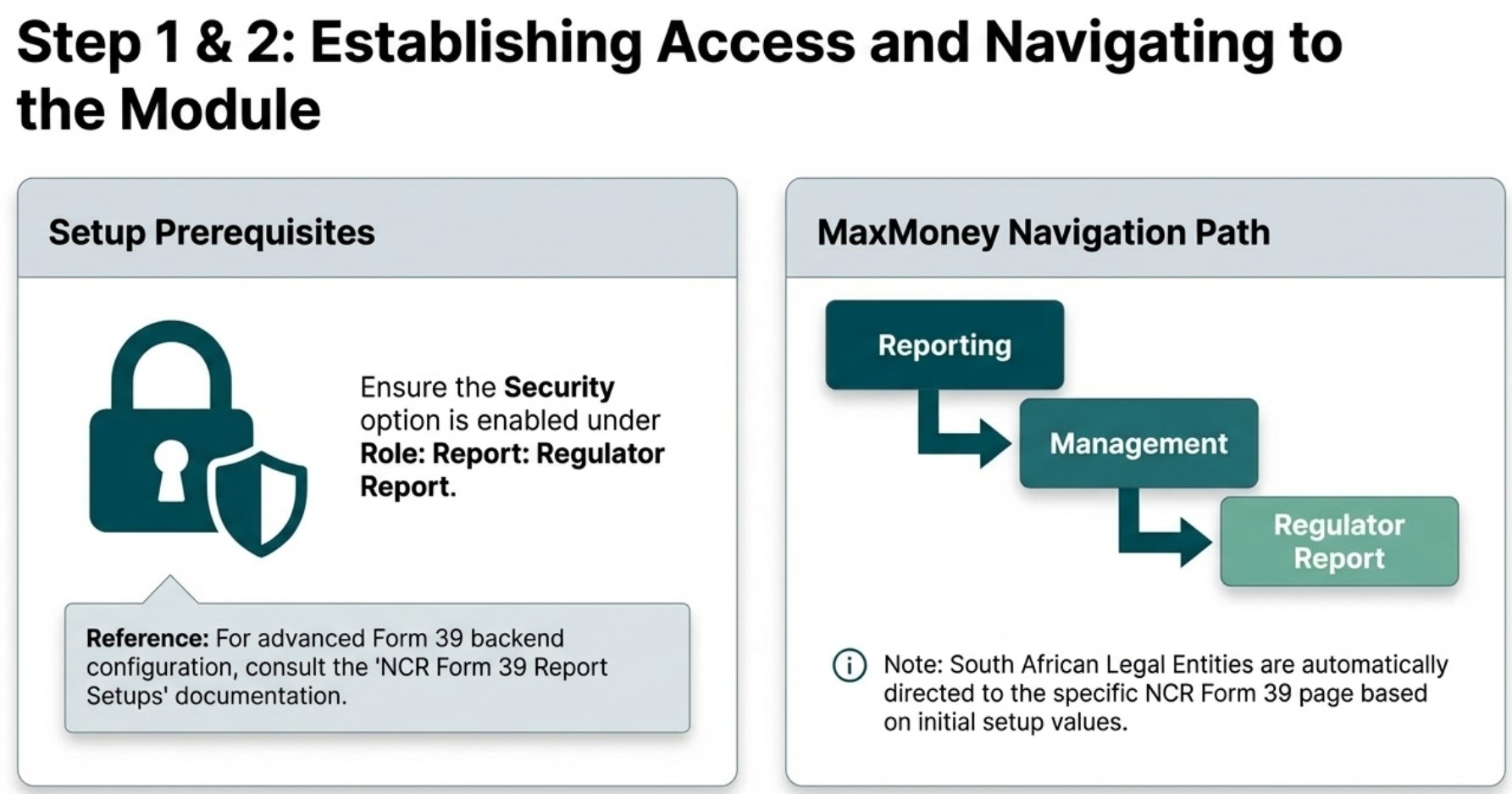
For South African Legal Entities, this section provides access to the NCR Form 39 Ask Window. This menu item is secured, and its initial values are pre-populated from the NCR Form 39 report setup. The Name/Designation, E-mail Address, and Contact Number fields are read-only. You can configure these under Setups > Reporting > NCR Form 39.
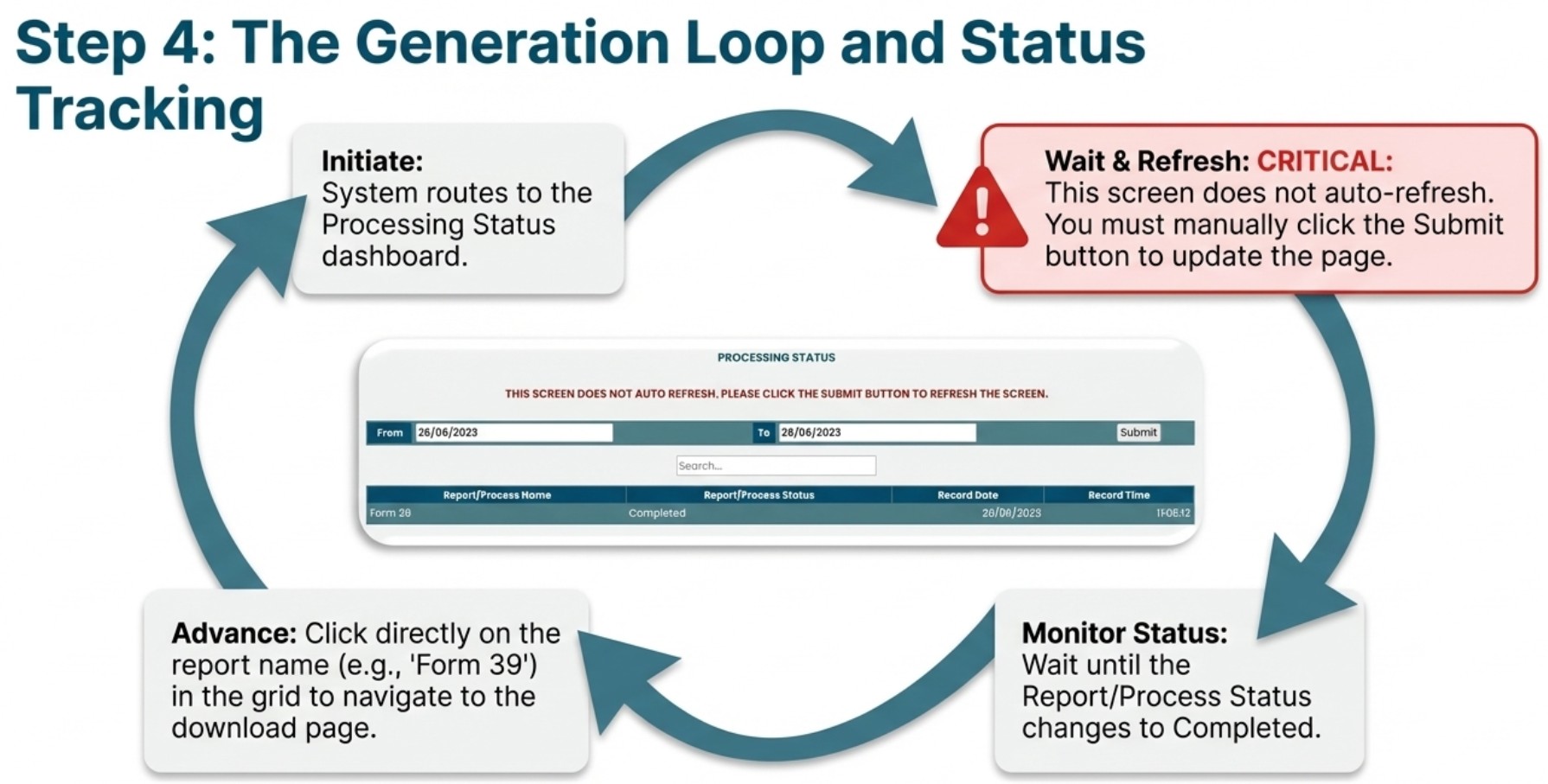
Once you initiate the report, the system will verify that documents are configured for all selected sections on the ask window. The data will then be processed, and values will be merged into the document tokens. You will then be provided with download links for the sections you've chosen to print.
The report offers the following selection options to help you filter information:
General
-
Branch: Select "---------" to include all branches, or choose a specific branch.
-
Region: Select "---------" to include all regions, or choose a specific region.
-
Start Date: Select the beginning of your reporting period. Refer to the table below for standard NCR quarterly reporting periods and their due dates. For the most up-to-date information, always check the NCR's official website:
www.ncr.org.za
-
End Date: Select the end of your reporting period.
-
Name/Designation of the person who completed this form: Enter the name of the person in your company responsible for completing and checking the NCR reports.
-
E-mail Address: Enter the email address of the person mentioned above.
-
Contact Number: Enter the contact phone number of the person mentioned above.
-
Number of Registered Branches: Enter the number of branches registered under your Legal Entity.
Financial
-
Credit Loss Provision: Indicate the percentage for credit loss provision.
-
Add Non-Loan Debt and Change: Indicate whether non-loan debt and change should be reflected in the NCR Form 39 reporting.
Sections
The credit categories are as defined in the National Credit Act and in Chapter 5 of the Regulations. If no activity occurred during the reporting period, then these items should be completed as ' 0 ' (zero). A credit provider will only complete the categories related to its operations. To view the layout of the various sections, follow this link .
-
Section 1 and 2: Summary of All Credit Agreements must be completed by all credit providers. It contains the totals of sections 3 to 14.
-
Section 3 and 4: Mortgage Agreements. If a credit provider does not engage in mortgage lending, then this page will be left empty.
-
Section 5 and 6: Credit Facilities
-
Section 7 and 8: Unsecured Credit Transactions Regulation 39 sets out the definition of Unsecured and Short Term credit transactions.
-
Section 9 and 10: Short Term Credit Transactions must be completed by microlenders.
-
Section 11 and 12: Other Credit Transactions. The Other category is for credit transactions that do not fall within the other named categories. "Other" would often relate to a credit transaction which is secured by an asset that is not immovable property. Credit granted against a policy or retirement fund will also be reported under "Other".
-
Section 13 and 14: Developmental Credit. Providers with supplementary registration for Developmental credit will always complete this page.
-
Section 17: Insurance must be completed by all credit providers except pawn brokers. Should no credit insurance be provided with the main credit product, the credit provider must indicate '0' balances.
-
Section 18: Pricing must be completed once a year as of December by all credit providers. For large credit providers, completing quarterly returns, this will be as part of the Quarter 4 submission.
-
The Declaration must be completed and signed by all credit providers.
Definitions and Descriptions
Historically Disadvantaged Person
- Refers to a
person that is Black, Coloured or Indian.
- If one or more individual in a joint
credit agreement is HDP, the agreement should be allocated to HDP.
Low income person
- Gross monthly income of up to R7500.00 per
individual.
- For instances where the agreement is
with more than one person, the allocation should be based upon the income
level of the primary income earner.
Residents of Rural, remote and low density areas
- Persons who
reside in rural or low-density areas, as identified on the list published by the
NCR.
- Agreements with persons who reside at names
mentioned on the list must be allocated to this field.