Sorting/Display Order
Client No,
Client Surname, Client Initials
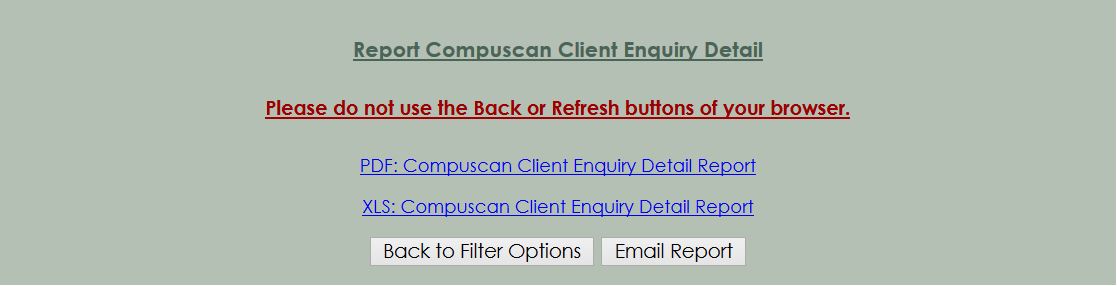
You can print, view or
e-mail the Compuscan Client Enquiry V1 Report. The number of
Compuscan V1 Client Enquiries been enquire

Output Format
- Click on
the Hyperlink "XLS: Compuscan Client Enquiry Detail
Report "
Spreadsheet
- You can open up reports in Excel or Open Office when they are
in this format. Once you have the information in Excel it is easy to
sort the information according to your specific business needs.
- Click on
the Hyperlink "PDF: Compuscan Client Enquiry Detail
Report "
PDF - You can easily print, fax or e-mail reports in this
format. Go to our
Handy Links
if you do not yet have a PDF reader installed
.
- The Report can also
Email to the specific User. The
necessary
Setups for Email address must be setup.
Columns/Detail
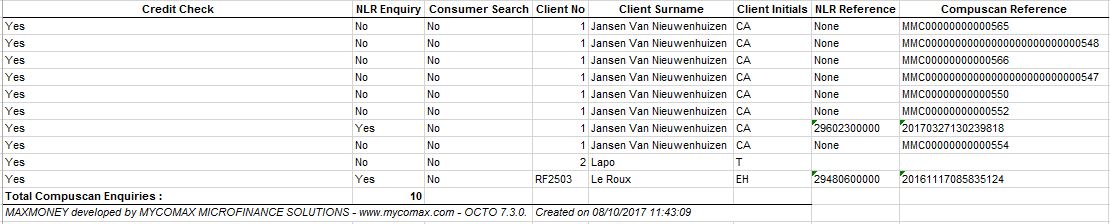
- The following information is available:
- Credit
Check: Was an credit check been done on this Compuscan Enquiry
- NLR
Enquiry: Was NLR Enquiry been done on this Compuscan Enquiry
- Consumer
Search: Was Consumer Search been done on this Compuscan Enquiry
- Client
Number: The Client Number of the client for this Compuscan Enquiry
- Client
Surname: The Client Surname of the client for this
Compuscan Enquiry
- Client
Initials: The Client Initials of the client for this
Compuscan Enquiry
- NLR
Reference: The NLR Reference for this Compuscan Enquiry
- Compuscan
Reference: The Compuscan Reference Number for this Compuscan
Enquiry
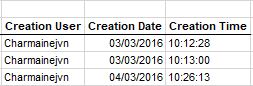
- Creation User:
The User whom create the Compuscan Credit Enquiry
- Creation Date:
The Date when the Compuscn Credit Enquiry was been created
- Creation Time:
The Time when the Compuscan Credit Enquiry was been
created
The following buttons are available
-
Back to Filter Option: Select the Back to Filter
Option to cancel this request and go back to the previous page
-
Email Report : Select the Email Report-button to
receive this report via email.