Overview
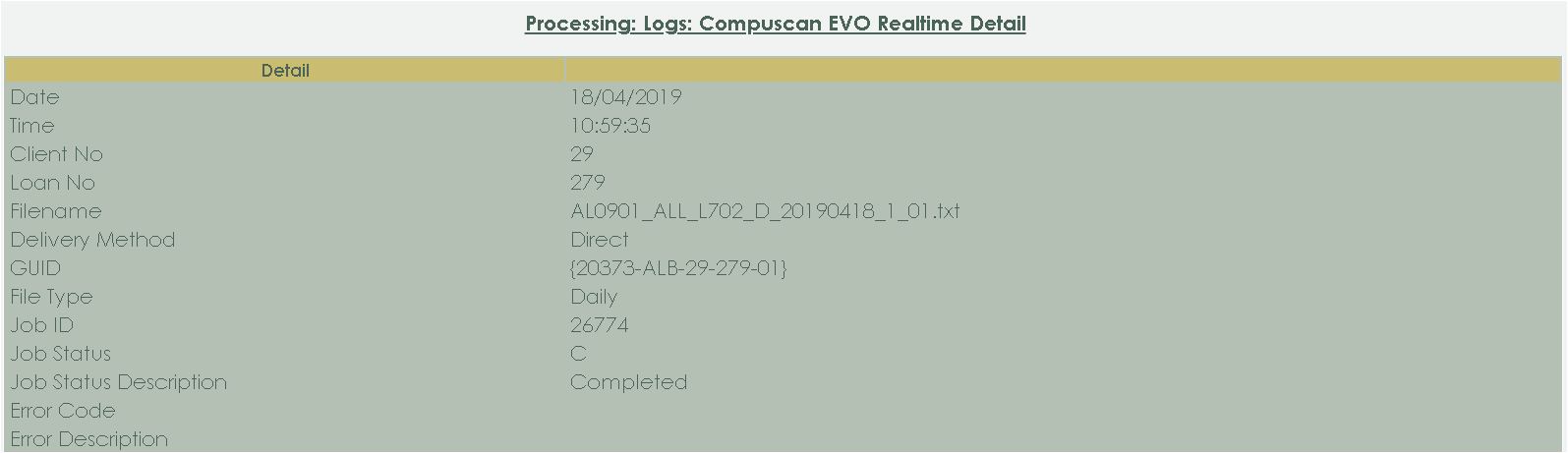
Processing > Logs > Compuscan EVO Realtime > Highlight the Compuscan EVO Realtime entry > Click on the Detail-button
Here you can compare the number of different kind of enquiries been sent up with the batch
Date: The date when the Compuscan EVO Realtime was sent to
Compuscan.
Time: The time when the Compuscan EVO Realtime was sent to Compuscan.
Client No: The client number
for whom the Compuscan Registration was sent.
Loan No
: The loan number for whom the Compuscan Registration was sent.
Filename: What is the filename of this specific Compuscan EVO Realtime?
Delivery Method:
Which method was the registration sent?
GUID: What is
the GUID for this specific registration?
File Type:
What is the file type of this specific registration?
Job
ID: What is the Job ID for this specific
registration?
Job Status: What is the Job Status for
this specific registration?
Job Status Description:
What is the Job Status Description for this specific
registration?
Error Code: If applicable, what is the
error code for this specific registration?
Error
Description: If applicable, what is the error description for
this specific registration?
The following button is available:
Back: Click on the back-button to go back to the previous page.