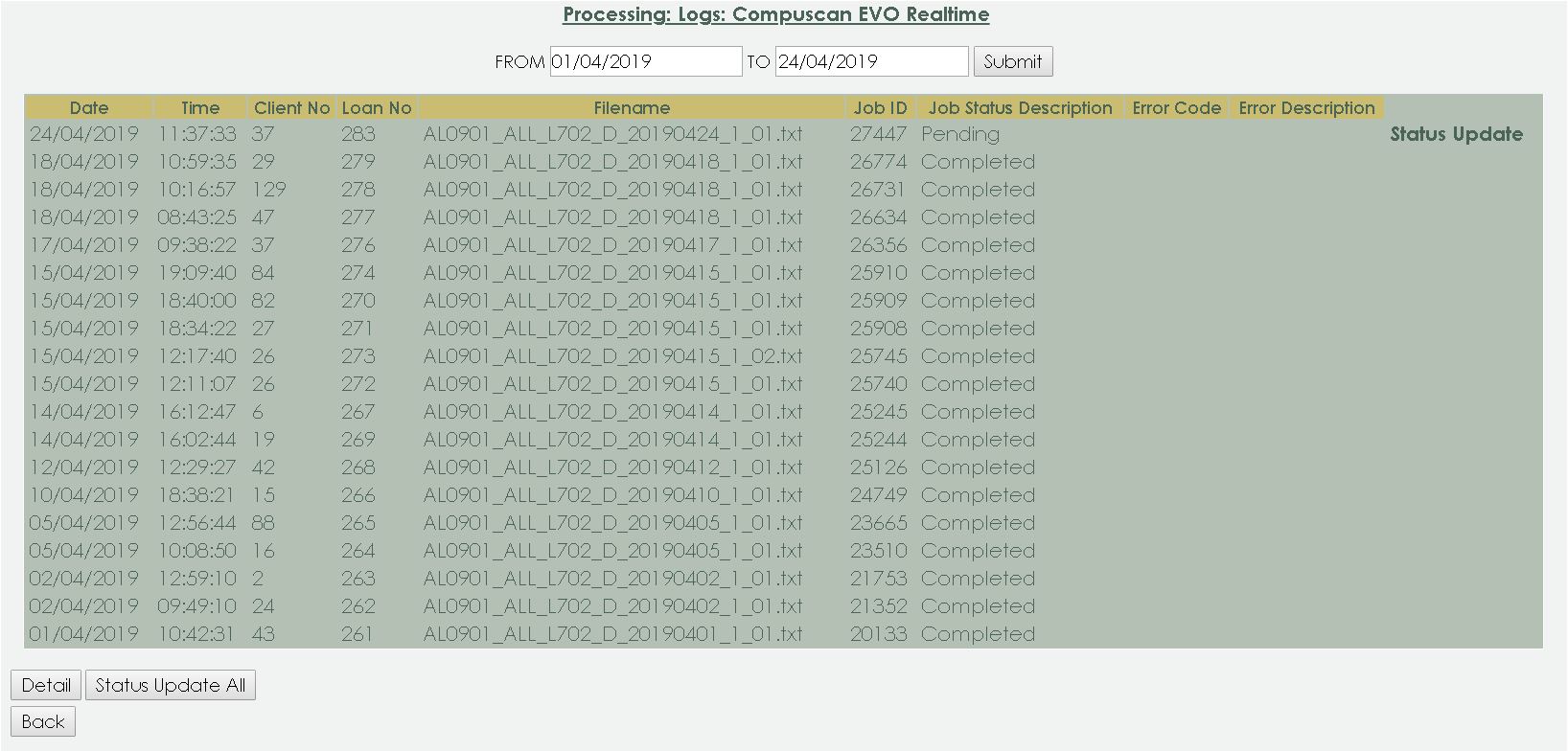
Compuscan EVO Realtime
Overview You will be able to view all the
Compuscan EVO Realtime for a selected date
range. Note you still
need to do your normal submissions to the EVO hub, this does not remove that
requirement.
Loan: When the user create an active loan,
it will automatically be registered at Compuscan.
The service allows you to upload files, EVO daily layout,
and we will have that loan live on the bureau within an hour . You can upload as
many files as you want in a day containing single or multiple records. There is
no limitation on your LMS or your subscribers.
All standard EVO validations are applied and we will ensure
no loan ends up on the system that would have failed via the EVO hub. We also
dedup in real-time to ensure that no duplicates are loaded whether it comes in
via the integration or via the EVO hub.
Enable the role on the user: Setup
> Security > option is available under the Processing: View Logs
A log will be created every
time a Import was execute. You
can also choose to view the log only for Today, Yesday or All. The Log
will display the newest on top. Select the Date Range From _____ To ________ and press on
the Submit Tab. You can also choose to view the log only for Today, Yesday
or All.
Everytime the back-end runs the compuscan
batch on your legal entity, a log will be created
The following details will display
on the screen:
Date: The date when the Compuscan EVO
Realtime was sent to Compuscan.
Time: The time when the Compuscan EVO Realtime
was sent to Compuscan.
Client
No: The client number for whom the Compuscan Registration
was sent.
Loan
No : The loan number for whom the Compuscan Registration was
sent.
Filename: What is the filename of this
specific Compuscan EVO Realtime?
Job
ID: What is the Job ID for this specific registration?
Job Status: What
is the Job Status for this specific registration?
Job Status Description: What is the Job
Status Description for this specific registration?
Error Code: If
applicable, what is the error code for this specific registration?
Error
Description: If applicable, what is the
error description for this specific registration?
The following buttons is
available:
Detail:
Highlight the Compuscan EVO Realtime entry and click on the Detail-button.
Status Update
All:
Back: Click on the back-button to go back
to the Log menu.