The system can communicate with Experian. This enables the users who have a Experian username and password to do enquiries in MAXMONEY on the Experian system and to save the results in MAXMONEY for future reference.
Setup > MaxConsumer > Experian Setup
The Security option is available under the Setup Section of the Role Setup > Experian : Experian Client Enquiry and Experian Non Client Enquirty
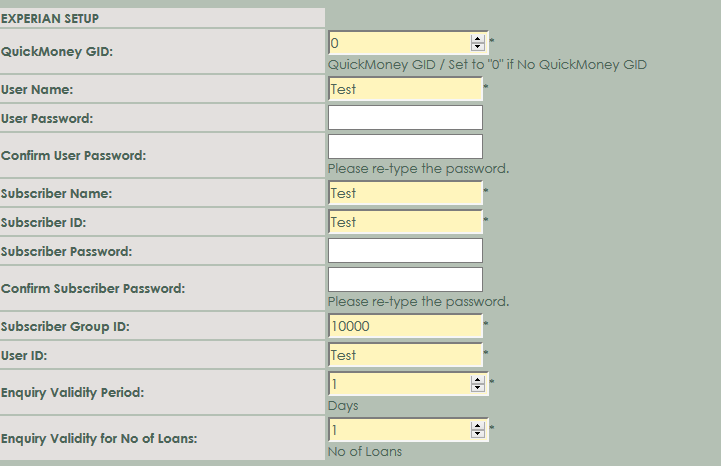
QuickMoney GID: Enter your QuickMoney GID in the space. This information is required. If you don't have a QuickMoney GID Number enter a 0.
User Name: Enter the User Name.
User Password: Enter your User password as supplied by Consumer.
Confirm User Password: Re-enter the password - the same as above.
Subscriber Name: Enter the Subscriber Name.
Subscriber ID: Enter the Subscriber ID.
Subscriber Password: Enter the Subscriber Password as supplied by Consumer.
Confirm Subscriber Password: Re-enter the password - the same as above.
Subscriber Group ID: Enter the Subscriber Group ID
User ID: Enter the User ID
Enquiry Validity Period: Enter the amount of days for the enquiry validity periods
Enquiry Validity for No of L oans: Enter the amount loans for the enquiry validity loans
Update History: Username: The Username whom update the information on the system
Update History: Date: The Date when the information was been update on the system
Update History: Time: The Time when the information was been update on the system
The following buttons are available:
Save-button: Click on the save button, to store the information permanently.
Cancel-button: Click on the Cancel button, to go to the previous sceen